Showing posts with label hobbies. Show all posts

Tuesday, January 18, 2022

[3D Printer Series] Understanding how to set z_offset on Klipper

 Z-Offset is a general name for telling the printer how far the nozzle is from some reference point. The reference point can be either a z end stop or the probe position of a bed probe like a BLTouch. The confusing bit is what happens when you have both an end stop and a probe. In that case you'll want to use the end stop to move the z-axis to a fixed position and then rely on the bed probe only for bed leveling/compensation.

Klipper doesn't explain how the different options interact with each other making this process very confusing. Additionally, following their calibration guide will lead you down the wrong path if you are using a similar configuration as me. Here's how I do it and why:

Offset for z end stop/probe for bed mesh

We will essentially be using the z end stop as our absolute reference, but when we add bed mesh leveling there's an important config that makes our bed mesh work relative to the z end stop, and that is the key. You don't need to do PROBE_CALIBRATE as we never try to use the probed position for absolute positioning.

  1. Use the [bed_screws] and [screws_tilt_adjust] configuration to define where the bed level screws are on the xy plane. While you're at it, create an OctoPrint macro/button to move the nozzle above the first screw, this will come handy later.
  2. Next, tighten all the bed screws so the nozzle doesn't crash into the bed.
  3. Use your macro to move the head above the first screw and home the z-axis.
  4. Adjust the first bed screw so that the nozzle is about 1-2 mm above the bed.
  5. Use the SCREWS_TILT_CALCULATE command to level the other 3 screws, repeat till you get it pretty close
  6. ACCEPT when you are done
  7. SAVE_CONFIG
  8. Preheat the bed to your normal print temp
  9. Run Z_ENDSTOP_CALIBRATE but use a feeler gauge to get a precise gap between the nozzle and bed, then subtract out the thickness of the gauge. We do this instead of the paper test because the bed is now heated and the gauge is an accurate thickness. This is your effective z offset. If you get an out of bounds error, you will need to configure the min z position with a small negative number.
  10. ACCEPT when you are done
  11. SAVE_CONFIG
  12.  Add a [bed_mesh] config, but be sure to include a relative_reference_index that corresponds to the first screw position.
  13. Run BED_MESH_CALIBRATE
  14. SAVE_CONFIG, if you look at your printer.cfg, see if you can find the bed mesh values at the end. The value for the relative_reference_index should be 0 if you've configured it correctly.
  15. Do a single layer test print. I use calipers measure the thickness of the layer. I'll then manually change the [stepper_z] position_endstop to tweak the first layer until I get a thickness that matches the thickness specified in the gcode.

[3D Printer Series] Updating Octoprint/Klipper for Python 3

 After upgrading/resurrecting my Sapphire Plus with a new cast aluminum build plate, 750 AC silicone bed heater, SSR, relay board, magnetic textured PEI build surface, I was prompted to update OctoPrint since it was going to stop supporting Python 3. Unfortunately, if you use OctoPrint w/ Klipper the update steps are a lot more involved than explained.

After you update your Raspberry Pi, you basically have to reinstall Klipper as well and installing Klipper on the Sapphire has a lot of special steps that are unique to the Robin Nano 1.2 board that we use. 

You need to follow the klipper install guide: https://www.klipper3d.org/Installation.html , but during the make menuconfig section you need to match this:


Then the make command failed for me. Previously, when running one of the earlier scripts I got a message that looked more like a warning than a true error: 
 InRelease' changed its 'Suite' value from 'stable' to 'oldstable' N: This must be accepted explicitly before updates for this repository can be applied. See apt-secure(8) manpage for details.
This turned out to be important and you need to run: sudo apt update --allow-releaseinfo-change

Which then allows you to update all the packages. The subsequent errors to make can be resolved by installing the missing packages using apt-get install <package>

Once make can run successfully, you still need to run (do not attempt to flash the mcu):

./scripts/update_mks_robin.py ./out/klipper.bin ./out/Robin_nano35.bin

Then you can use something like Filezilla to SFTP the Robin_nano35.bin file to your computer and then onto a microSD card to put in the Robin nano. If the LCD screen never goes blank, you will likely have to repeat the process starting from make, but before you do run:

make clean

If the screen does go blank, it means the update succeeded so you should remove the SD card and restart the MCU

Thursday, December 11, 2014

How to: Find out where your stock images are being used

I don't do much stock photography anymore, but when I did, I always found it helpful to understand how my sold images were being used so that I could create more images to fit that niche. Unfortunately, the stock photo agencies don't provide any feedback regarding who or how your images are being used. Luckily Google has come to the rescue with a feature many aren't that familiar with: Image Search. If you use Chrome as your web browser, things couldn't be any easier as I'll show you.

Using Chrome:
1) Let's try and see where my most recently sold image is being used.
2) Navigate to your stock photo site and find the image you want to search with.
3) Right-click on the image you want to search for and select Search Google for this image

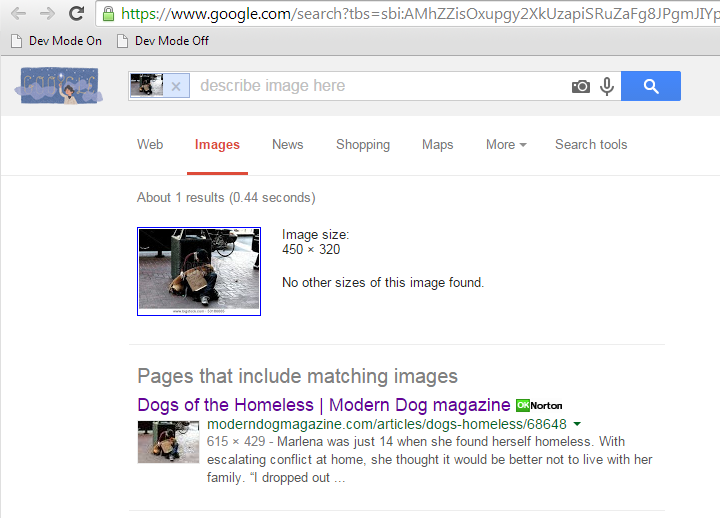
4) Then a new tab will be created with your search results:


5) Looks like an online dog magazine is using my photo. Let's see inside:


Searching Without Chrome:

1) Navigate to your image at the stock agency as before.
2) This time right click on the image and select "Copy Link Location" or "Copy Link" or a similar option (depending on your browser).
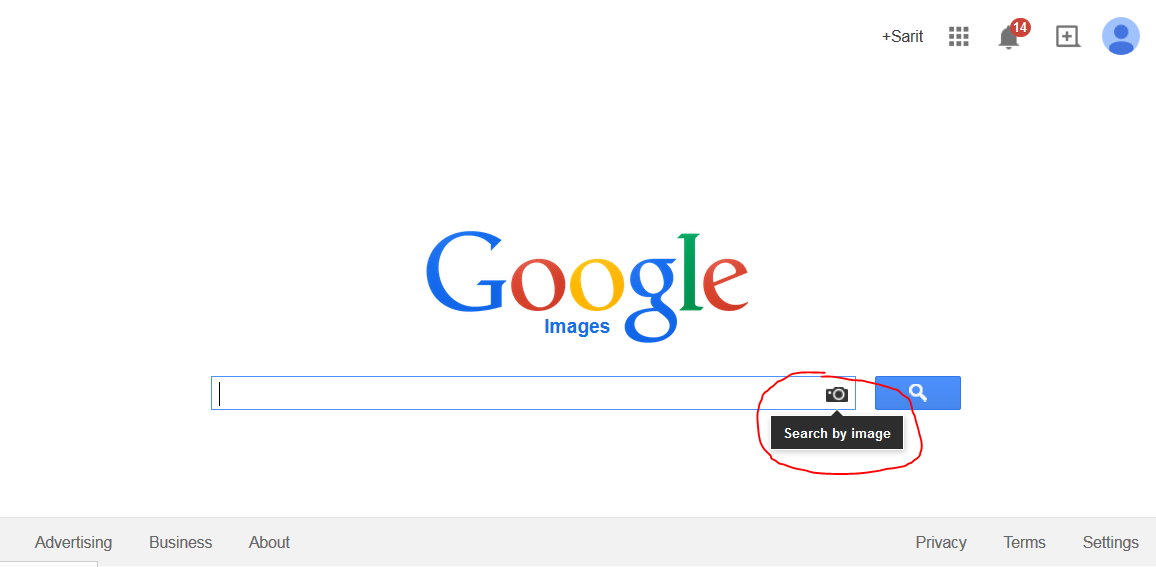
3) Open a new tab on your browser and goto images.google.com
4) Click on the camera icon in the search field to open up the search by image dialog
5) Right click in the Paste Image URL input field and select Paste (or use Ctrl-v for you techies).

6) Click Search by image and you should be rewarded with the same search results you see in the chrome section.


Thursday, March 12, 2009

America's Next, Next, Next,.....Next Top Model

We took a couple photos of my daughter today. I'm really pleased with how they turned out. This set makes her look like a posing fashion model. I guess anytime you get some wind blowing into the hair you're gonna get that cliche fashion model shot.

Monday, September 29, 2008

Taking Close-Up Photos

I've barely had any time to sleep let alone blog so I'll make this short and find a way to work it into my photography guide later.

A good close-up shot requires two things, a properly setup camera, and good framing.

Setup

  • Use the largest aperture that you can while keeping the main subject in focus. Depth of field will really make the subject pop out.
  • When making the closeup, use more zoom (increase the focal length) rather than moving closer to the subject. This will reduce the effect of perspective, which makes objects up close look fatter than normal.
  • If you have them, set your camera's focus points to the part of the frame you intend to put the subject.

Framing the Shot

  • Avoid the temptation to put the subject in the middle of the frame and zooming out until the subject is completely visible. Here you can see how my daughter is off to one side. If I had tried to capture my whole daughter's body, the attention would have been drawn away from her playing with the puzzle pieces.

  • Use the entire frame. Just like in the previous shot, rather than zooming out to get the whole subject, we actually zoom in to fill up the entire frame. This makes the the entire photo interesting.

  • Use perspective to your advantage. I know earlier we wanted to minimize perspective to minimize distortion, but sometimes you can use this distort to make things appear to be coming right at you.


  • Don't be afraid to crop the subject. Cropping is where you select a rectangular portion of a image and eliminate the rest of it. Usually you will size the rectangle to include all the important bits, but here you can see that I cropped a part of my baby's face. Doing this let me split the viewer's attention between my daughter and my wife in the background.


  • Experiment! This by no means encompasses all the techniques that you can use. Remember digital photos are free, take lots and try different things. There's no better teacher than experience.

Friday, May 30, 2008

Low Cost High Output Aquarium Lighting

I've recently gotten into the aquarium hobby. I started off by buying a 30 gallon tank & stand w/ everything including 3 fish off of craigslist for $40. I then decided that it would be fun to have some real plants with the fish but later found out that you need much more light than what you would normally get with those standard perfecto light hoods. After checking out how expensive the more powerful lights were I figured it would cheaper and cooler to make your own supped up light hood.

Light Bulbs

I used those spiral compact flourescent bulbs you get at the Home Depot. I got a 4 pack of the n:Vision daylight 14 watt bulbs for about $10 since they fit nicely in the original perfecto brand hood. The "daylight" variety is important because plants only absorb certain spectrums (ie colors) of light found at both the low (reddish) and high (blueish) end of the spectrum. The "daylight"'s include more of the blue spectrum which is especially good since that part of the spectrum can penetrate deeper into the water to the plants at the bottom of the tank.


Light Bar

The light sockets were $1.50 a piece and made of porcelain (which I found can easily break if dropped). These didn't come with any bracket to enable you to mount the socket to anything, so I had to fabricate some out of aluminum angle iron. The brackets were mounted to an inch and a half wide piece of steel bar stock. I drilled the bar stock in precisely the same locations as the plastic standoffs on the original plastic hood. This allowed me to secure the bar to the hood while leaving a gap for wiring between the bar stock and the hood. The bar stock was also drilled with larger holes to allow the wires from the socket to be routed through. I used rubber grommets in those holes to prevent the wires from getting rubbed against the hole edges. I removed the original switch and wired everything in parallel using water resistant twist ties. I also painted the interior of the hood with flat white paint which should reflect more of the light back down into the tank and reduce the heat.
Note: to drill bar stock and brackets I had to use a drill press and some cutting oil to keep the bits from wearing out prematurely.


Ventilation

Since the lights did produce a lot of heat, I drilled several holes in the plastic hood for ventilation. That still wasn't good enough so I added a 12 volt PC fan, by using a AC-DC transformer from radio shack (one of those wall warts) and wired it to a 5 watt 100 Ohm rheostat that I got from Jamesco (a local electronic supplier). To make it nice, I mounted a female DC socket in the middle and wired everything to it. The rheostat (at the bottom) lets me control the speed of the fan (by varying the resistance) so that it doesn't get too loud. The fan is mounted on the top and I used some rubber plumbing washers as standoffs to minimize the vibrations transmitted to the hood.


Moonlight

I also added a moonlight, by attaching a blue cold cathode light kit used by PC-modders. Since they run off of 12 volts, I just wired it in parallel to the DC fan (excluding the rheostat). The light and fan stays on even when the main lights are off. They provide a soft light that some believe mimic the light coming from the moon which might encourage the fish to breed.


Total Cost
Overall I estimate that I spent about $70 for this project. The largest cost was the AC-DC transformer at $26 and the cold cathode light kit at $10. If you take those out the cost is around $35. This gives me 56 watts of power (just under the 2 watts/gal target that I wanted). The best part is when the bulbs wear out, it only costs about $10 to replace all of them.

Saturday, May 17, 2008

Awase Miso Soup Recipe

I can't take full credit for this since, its mostly wife's recipe, but hopefully I can show you some techniques to make a real awase miso shiru otherwise known as blended (red & white) miso soup.

Ingredients (1 serving size):
1 heaping Tbsp awase miso paste
1/2 green onion sprig
1/3 pkg soft or silken tofu
1 cup dashi (recipe below)

Red miso is a specialty in my wife's hometown of Nagoya, Japan. It has a much deeper more salty flavor than the more common shiro miso or white miso which is a little sweeter. If you blend them together, you get the best of both worlds. Luckily, the Japanese have already thought of this and sells a blended version known as awase miso. Of course if you can't find it at your local asian food market, you can always buy them separately and mix them yourself. Don't worry, this stuff is packed with salt so it will practically last forever.

Dashi is another major component of this and almost all other Japanese soups. Dashi is a broth made from either fish or a type of seaweed known as konbu. Typically, it is made bonito flakes, which are the shavings of a dried fish that you can buy at most asian food stores. To make it, you bring water close to a boil, add a bunch of flakes, let it steep for a few minutes then scoop out the flakes. We like the taste of bonito flakes, but its a pain to scoop them out so we buy bonito flakes prepackaged in tea bags (see photo on the left). Just like when making dashi with just the flakes, you should bring the water up to just before boiling before adding the bonito package. You must also keep the water from boiling while you steep the bonito flakes. If you let the water boil, the dashi will become bitter. Once your dashi gets a nice golden color and you can smell the ocean in it, you can remove the package and your dashi is done! You can also make a larger amount than needed and freeze the leftover dashi in a plastic container. My wife likes to freeze it in ice cube trays, but I think that will just make the rest of the food in the fridge smell fishy, hehe.
Once you have good dashi the rest is easy. Simply dissolve the red miso paste into the dashi. I find it helpful to use two spoons to smash the miso while submerged in the dashi. Its okay for there to be some bits that don't seem to dissolve. You must taste the soup as you are adding miso to ensure you have the right amount of saltiness. You will want it to be a little extra salty to compensate for the bland tofu you will be adding. Next dice your tofu into quarter inch size cubes and add them to the soup. Be sure to keep the soup from boiling after adding tofu or else your tofu will get tougher. Then serve in a miso soup bowl (something my wife requires), but if you don't have one, any bowl you don't mind sipping directly from will do. Finally, garnish with the finely chopped green onion.
Hope you enjoy it.

Tuesday, March 11, 2008

Digital Photography 101 (part 2)

Choosing the Right Camera
Some people say the camera is only as good as the person using it. Although that may have been true in the days of manual film cameras, the amount of new technology crammed into modern digital cameras helps even mediocre photographers look like pros. Unfortunately, technology can't break the laws of physics yet, so you still need to understand what physical limitations your camera has.

Function over Form
Go to any big box electronic retail store and ask the sales guy what's the most important feature customers are looking for in a camera and they will say that it's the style and look of the camera not the kind of picture it produces. Since we are all price conscious consumers, this has led manufacturers to make two types of cameras: stylish cameras that take bad pictures, and ugly cameras that take stylish pictures. Therefore, chances are, if your camera comes in four designer colors like in the picture to the right, it's probably time to be shopping for a new camera.

Compactness Has its Usefulness
I'm not saying that you should be throwing away your compact, portable cameras. Often times, their portability means you can always have them around to take shot whenever you see something interesting. Also these small cameras are often inexpensive, making them suitable for places where your more expensive equipment might get damaged or stolen. Since almost everyone has one of these cameras nowadays, I won't go into them any further.

Fixed Lens vs DSLR
High performance cameras fall into two main groups: Fixed lens (or standard digital camera) or DSLR (Digital Single Lens Reflex). As you can guess the biggest difference between these two is that DSLR's are designed with interchangeable lenses in mind. Your fixed lens camera should have a decent optical zoom range and aperture size. Most "prosumer" models have attachments that go over the fixed lens to increase the zoom or increase the field of view however if you are planning to go that route it would be better to jump directly to the DSLR since any lens you buy is likely to remain compatible with the cameras you buy in the future (provided you stay with the same camera company).

Must Have Features
  • Manual shutter speed, aperture, ISO control - Lets you control the exposure. Be sure that there is a way to manually set all of these at the same time.
  • Little or no shutter lag - Shutter lag is the time between when you press the button to take a shot and when the camera actually takes the shot. Anything that takes longer than a split second on a sunny day is too long in my book.
  • A low noise/high ISO capable sensor is a big help in low light situations when you need a higher shutter speed
  • A Shutter timer lets you press the shutter button, but the camera wont take the shot until a few seconds have passed. This is invaluable for taking those long exposure shots where the shake from pressing the button will cause motion blur.
  • RAW file format - If you're willing to deal with larger image files and post-processing software, then being able to shoot in the camera's "raw" format (instead of Jpeg) is the only way to go. Raw formats usually contain much more image data especially in the dynamic range, allowing you to recover hidden detail even with a badly exposed image.
  • Adjustable autofocus points and/or manual focus - Often times what you want to focus on isn't exactly in the middle of the shot.
Nice to Haves
  • Hot shoe for flash - if you need a flash, you must use an external flash simply because no built-in flash can provide even diffuse lighting if its shining straight at the subject inline with the camera.
  • White Balance metering - Not necessary if you shoot in raw, but if you're not, then this will ensure that your images show up with the right colors.
  • Image Stabilization - This will allow you to take some shots that you couldn't without a tripod. It only helps if you are moving, not so much if the subject is moving. On DSLR's this is sometimes implemented in the body and other times its in the lens.
Since the price of entry level DSLR's have been plummetting I will recommend that you get a DSLR if at all possible. There's really no substitute to the flexibility of attaching different lenses to your camera. Plus there is no single lens that is good at everything so its unlikely that the lens on a fixed camera will suffice for all your needs. In my next article I'll delve more into the specifics of shopping for a DSLR so you can make an informed decision.


Digital Photography 101 (Part 1)
Ever since the advent of the first digital camera, photography has experienced an explosion of growth. Nowadays, its hard to even find a cell phone without a camera. Unfortunately, the ability to take limitless shots without wasting any film and the ubiquitousness of the digital camera has not done anything to improve the quality of the pictures we take. I'd like to change that.
Taking good photos is not difficult. You don't need an expensive equipment, and once you get it you may find photography to be a fun and rewarding hobby.

Camera Operation
Cameras work by allowing light to come through the lense which focuses it onto some sort of sensor (or film for traditional cameras). The light is only exposed to the sensor for a very brief amount of time. That light will cause the sensor to create all sorts of electrical signals representing the image that the camera sees at that point in time. The camera's internal computer will then convert those signals into a digital image file on your memory stick. I've glossed over several details here, but this is the general idea and it will serve as the basis for the rest of the article.

The Basics of Exposure
Exposure is all about how we get the light from the scene you are photographing, to the camera's sensor. Most digital cameras allow you to modify 3 basic components for controlling your exposure. Understanding how these components affect your exposure will help you keep most of your photos out of the recycle bin.

1. Lenses
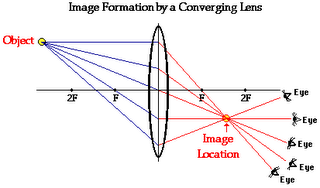
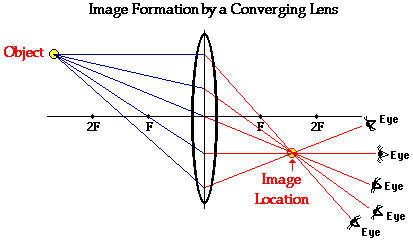
When light enters the lens, the light gets focused onto our camera sensor. Just like how your eye glasses can have different strengths, camera lenses have different strengths too. To measure this we use the term focal length. Focal length is measured in millimeters (mm). If you want to shoot something far away, you will want a lense with a large focal length (ex. 800mm). These are called telephoto lenses. If you want to shoot something thats really huge and you don't want to step back so much to get everything in the shot, you'll want a small focal length (eg, 17mm) these are often called wide-angle lenses. An easy way to remember this is to imagine that all the light that enters the lens is in the shape of a cone and the focal length controls the height of this cone. Smaller focal length means you have a short cone with a shallow slope so the light cone casts a wide view (ie wide angle lens). Larger focal length means a steep cone so things far away seem bigger (ie telephoto lens). When you zoom in or out you are changing the focal length of the lense. As you can imagine, a larger cone allows more light in which will change your exposure. Conversely, a telephoto lens allows less light to enter, however that is not the only issue. With telephoto lenses, the image magnification, also causes angular camera motions to be magnified. That is, as you zoom in, any movement in the hands holding the camera will be magnified in the photo.
Usually the scene you are trying to capture will dictate what lens or focal length you will use. However, sometimes if you cannot get enough light or you cannot hold your camera steady enough, it might be better to use a lower focal length and resize the image in post processing later.

2. Aperture
Besides, focal length, the next most important aspect of a lense is how much light it can let in. Usually the light that enters at the edges of a lense gets distorted so camera lenses limit that light with an O-shaped disk placed between the lenses. The hole in this disk is called the aperture and can be enlarged or reduced by the camera or by rotating a ring on the lens itself. A bigger hole lets more light in but with a more narrow depth of field (which we'll get into later). Aperture is measured in f-values (ex. f/22 or f22) . The lower the f-value, the bigger the aperture so f/22 has a much smaller hole than f/1.4.
When buying a lens or a camera with a lens you will probably see it listed like this: 18-55mm F/3.5-5.6.
The first part means that the focal length can vary between 18mm and 55mm, but the second part doesn't mean the aperture can be from f3.5 to f5.6. It means that the largest aperture can vary between f/3.5-f/5.6. Most lenses can easily produce small apertures f/30+. The hard part is keeping the apertures large throughout the range of focal lengths. That's why the largest aperture that you can use will shrink when you zoom in.
Depth of field is the range of distances from the camera where things will be in focus. Lets say you wanted to take some landscape photos. You would probably like the wildlife in the foreground and the mountains in the background to both be in focus. In this case you want to have a wide depth of field. On the other hand, suppose you wanted to emphasize the subject of the photo, you could use a large aperture to create a shallow depth of field so that only the subject of the photo is in focus. The photo to the left is my baby Sophia sleeping next to her mom. Notice how Sophia is in focus while my wife isn't. This was shot with an aperture of f/2.8.

2. Shutter Speed
Shutter speed is the amount of time that the aperture will remain open so that light from the scene can reach the camera's sensor. This is measured in seconds or fractions of a sec like 1/30. Since most photos are taken with shutter speeds like 1/20, 1/30, 1/100, etc, your camera may show only the denominator of the fractional part like so 1/20 is shown as 20, 1/30 as 30 and 1/100 as 100. Long shutter speeds like over 1 second, will usually be displayed with a double quotation mark, like 2".
The combination of shutter speed and aperture determines how much light gets to the sensor, i.e. the exposure. For example, if you let light through a large aperture for a short time, you can still get the same exposure by letting light through a small aperture for a longer time. The biggest drawback to a long exposure is that the camera and the scene has to be perfectly still during the entire time that the shutter is open, otherwise your photo will be blurry. This type of blur is known as motion blur. In the photo on the right, you can see how the the people who were moving look kinda ghostly while everything else is pretty sharp. The woman in the center remained almost perfectly still during the shot so she had almost no motion blur. This was a 2 second shot (shutter speed) at f/8.

3. ISO Sensitivity
Also known as the ISO speed, the ISO sensitivity of the camera's sensor is the third and final component of determining a photo's exposure. Camera sensors usually have the ability for you to increase or decrease its sensitivity. You can think of this like the volume knob on your car radio. If you get a weak signal, you can up the volume, but the more you turn the knob, the more noise you will get. ISO sensitivity works the same way. The higher the sensitivity, the less light you will need, but at the cost of more noise in your photo. Ideally, you want to use the smallest ISO possible for the aperture and shutter speed that gives you good results. Often times the lowest shutter speed that minimizes your motion blur is the driving factor for the ISO you use. Its usually easier to correct ISO noise in post processing than motion blur.

Thursday, January 31, 2008

Got my FCC Amateur License today
I am now a certified FCC Amateur Technician. All you have to do is pay $14 and pass a multiple choice test. This is basically the license you need to be a Ham Radio operator, but I got it so that I could legally use those high powered 2.4 Ghz A/V transmitters that I plan to mount to my R/C monster truck! It's gonna be sweet!
My callsign is KI6NZP. Unfortunately, FCC regulations require me to send my callsign every 10 minutes and at the end of my transmission. Perhaps I can put my callsign on a sticker within the field of view of the camera that I'll use.
The certification came in both a large size (for you to frame) and a convienent wallet size version.

Wednesday, March 07, 2007

My future workbench

I'm planning to move my hobbies down to the garage (apparently the dining room table is for eat on) so I starting scoping out a place in the garage to fit a workbench. Shopping online didn't turn up anything that would make good use of the space I had so, I figured, why not build my own?
First things first, I had to design it. Most engineers would immediately start up their CAD program, but I didn't want the fork over a couple grand on a overly complicated program that would take me a week to use. Luckily it turns out that Google makes a program thats FREE called
SketchUp that does exactly what I want. One of the neat features is that you can upload your models to share them with all the other SketchUp users. Here's the file for my workbench. Notice that I have casters on the outside. There's a hinge on the wooden flap attached to the casters that allows the wheels to flip up when the table is lifted. This makes the casters extend below the legs of the table, hence movable. When you're done, flip the wheels back and you got 4 sturdy legs to stand on again.