I don't do much stock photography anymore, but when I did, I always found it helpful to understand how my sold images were being used so that I could create more images to fit that niche. Unfortunately, the stock photo agencies don't provide any feedback regarding who or how your images are being used. Luckily Google has come to the rescue with a feature many aren't that familiar with: Image Search. If you use Chrome as your web browser, things couldn't be any easier as I'll show you.
Using Chrome:
1) Let's try and see where my most recently sold image is being used.
2) Navigate to your stock photo site and find the image you want to search with.
3) Right-click on the image you want to search for and select Search Google for this image
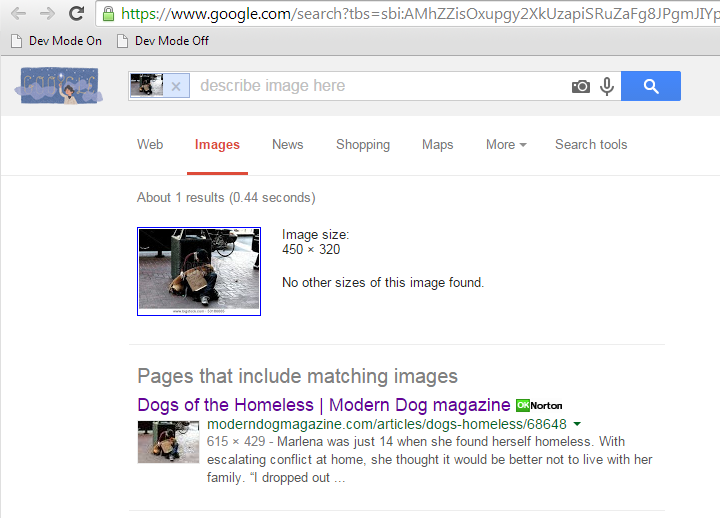
4) Then a new tab will be created with your search results:
5) Looks like an online dog magazine is using my photo. Let's see inside:
Searching Without Chrome:
1) Navigate to your image at the stock agency as before.
2) This time right click on the image and select "Copy Link Location" or "Copy Link" or a similar option (depending on your browser).
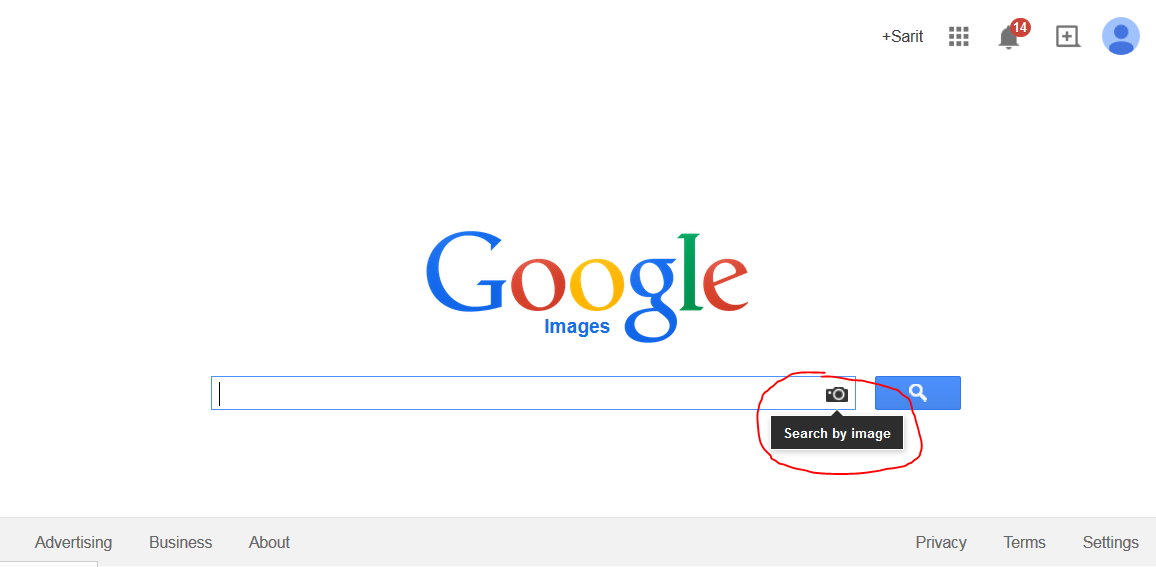
3) Open a new tab on your browser and goto images.google.com
4) Click on the camera icon in the search field to open up the search by image dialog
5) Right click in the Paste Image URL input field and select Paste (or use Ctrl-v for you techies).
6) Click Search by image and you should be rewarded with the same search results you see in the chrome section.
Showing posts with label photography. Show all posts
Thursday, December 11, 2014
Tuesday, December 09, 2014
Camera Flash Tutorial (Part 3: Key Lighting)
For part 2 go here: http://saritsblog.blogspot.com/2014/12/camera-flash-tutorial-part-2-theory.html
In our last tutorial, we talked about moving your flash away from the camera, but we never talked about exactly where to put it. Knowing where to put and point your lights is where your technique and creativity takes shape.
More Terminology
When it comes to lighting, it helps to know about 3 basic types of light and what effect they provide in the scene:
Now that we understand the different types of light we can use in our scene, its time to formulate a lighting strategy that you can apply to any scene.
Here's my strategy:
In our last tutorial, we talked about moving your flash away from the camera, but we never talked about exactly where to put it. Knowing where to put and point your lights is where your technique and creativity takes shape.
More Terminology
When it comes to lighting, it helps to know about 3 basic types of light and what effect they provide in the scene:
- Key Light - These are the main lights used to "produce" the shadows. If we remember from the previous tutorial, we need to make sure the key light points in a direction that is different from the direction our camera is pointing at.
- Fill Light - Since the key light's goal is to define the shadows, sometimes those shadows become too dark to make a properly exposed photo. The goal of the fill light is to bring just enough light to the dark areas to show what's in shadow without blowing away the shadow itself.
- Rim/Hair/Kicker Light - Sometimes the background of the scene blends into the subject you are focusing on. Think of a black haired singer on stage in front of a black curtain. It would be hard for viewers to tell where his/her hair ended and where the curtain begins. The rim light's goal is to define the edges between the subject and the background. In the case of hair, this can be done with the light behind and above the subject point down onto the head.
Types of Key Lighting
- Regular or just Key Lighting - Just use light your subject to get the right exposure. Most of the time you will be doing this. Typically, a light coming 45 degrees from the left or right is a good starting point. The more perpendicular this light is to the camera the longer the shadows will be which creates a more striking and dramatic the look. The closer to the camera the more even lighting will be. This is often best for beauty shots where you want the skin to look more smooth and even.
- Low Key Lighting - "Low" in this case simply means dim. This provides a very dramatic look. The key to taking this photo is to use enough light to properly expose a portion of the subject and design the lighting so that it falls off rapidly everywhere else. As you can see in the photo to the right, the girls face is well exposed but the light quickly diminishes over the rest of her body.
- High Key Lighting - Here we increase the light or exposure until things seem overexposed. This creates a more light ethereal feel. Shadows are

High Key Lighting - Photo by https://www.flickr.com/photos/ribenawrath/
https://creativecommons.org/licenses/by-sa/2.0/
![]() |
| Low Key Lighting - Photo by Bonita Suraputra https://creativecommons.org/licenses/by/2.0/ |
Fill Light
Often times after key lighting, the shadows end up being too dark so we need to use some fill lighting to lighten them up. Remember how using on camera flash eliminates shadows? This is the perfect time to use your on-camera flash to lighten shadows. By adjusting the Flash Exposure Compensation (FEC) you can dial-in exactly how much you want the shadows lightened. This is particularly useful in direct sunlight photos as you can see below. Because the girl is being backlit by the sun, her face would have been completely dark just like the shadows you see on the stairs. The fill flash is just powerful enough to show the details while letting the sun do most of the work.
![]() |
| Fill flash used to brighten the face. Notice how dark the shadows are on the stairs. |
You can even use the sun as both the key and fill lights by using a reflector as show below.
![]() |
| Using a reflector to provide fill light - Photo by Peter McConnochie https://creativecommons.org/licenses/by/2.0/ |
Rim/Hair Light
Lastly, separating the subject from the background is easily accomplished by placing the light directly behind and/or directly to the side perpendicular to the direction the camera is shooting depending on the effect desired. This type of lighting creates a great effect on anything with hair like this teddy bear for instance.
![]() |
| Rim light separates bear from background - Photo by Nomadic Lass https://creativecommons.org/licenses/by-sa/2.0/ |
Kicker
Kickers are technically different from rim lights but their use and effect are close enough that I've grouped them together. The goal here isn't to create a silhouette, but to give some highlights or a "kick" on the side of the subject. Using kickers can be tricky and usually requires an artificial light to get the right placement and control to produce pleasing results so I recommend holding off on using them until you've mastered the other lights.
Putting it all together
Now that we understand the different types of light we can use in our scene, its time to formulate a lighting strategy that you can apply to any scene.
Here's my strategy:
- Identify all the sources of light - This can be sunlight, reflectors, flash, candlelight, street lamps, neon signs, etc. See what kinds of light you can and cannot change. Sometimes using the light that's already there can be much easier than trying to illuminate everything yourself. It also tends to look more natural if you can use existing lighting instead of trying to overpower it with your flashes.
- Compose your scene - Pick your subject/foreground/background and pay attention to how the light is reacting. Try to expose your scene for the elements that you cannot control, like a sunlit building in the background. You can then adjust the light output of the things you can control to get the correct exposure for everything else.
- Decide if you need fill lighting - If one side is in shadow, see if moving around causes other lights to form rim/hair lights. Rim lighting can sometimes take the place of fill lighting if the outline provides the necessary visual interest. If you need to add fill light, see what you can use, be it flash, reflector, or someone with a flashlight.
- Decide if you have enough key lighting - If the subject lacks definition or appears flat, try adding some sort of key light or try increasing whats there by adding a flash firing in the same direction. Since you use key lighting to produce shadows, you can increase the effect of key lighting by reducing fill lighting to some extent. Try covering up or blocking lights that are throwing too much fill light into your scene.
- Decide if you need rim/hair lights - If you still have some available light sources to do rim lighting and its not too inconvenient , I say give it a shot, always. Sometimes you won't want it for dark, moody pictures but for the most part it generally looks good on everything else.
- Take your photo - Hopefully, after going through these steps and examining your photo, you'll instinctively know what tweaks need to be made to get exactly what you want in your shot.
Wait there's more...
For completeness sake there are also background lights which you can guess are there to illuminate the background. You typically won't use these unless you have a background small enough or enough lights to adequately illuminate it. If you set your exposure for the background first, you can usually avoid them.
Monday, December 08, 2014
Camera Flash Tutorial (Part 2: Theory)
For part 1 go here: http://saritsblog.blogspot.com/2014/11/camera-flash-tutorial-part-1-terminology.html
Light Direction Matters
What's the difference between a mug shot and a flattering portrait?... Shadows!
How do you control shadows?... Light Direction!
Natural light doesn't stream directly from your eyes, bounce off the subject and get reflected back into your eyes. If it did, I'd get them checked, but also everything in the world would look flat and shadow-less to you. The fact that light usually illuminates a scene at a different angle from the direction you are looking at is what allows you to see shadows (which is what most people are accustom to seeing, aka "natural"). So what happens when you put the major light source (ie flash) right on top of your camera and use it to illuminate the scene?... You guessed it.. No shadows!
Making Shadows
To create shadows we have to make sure the direction of the light is different from the direction of the camera.
There are a 2 ways to do this:
Bounce flash, although free (if you have a flash that can articulate) has a couple problems. First, there's not always a nice big wall or ceiling to bounce the flash off of. Second, whatever you use to bounce from better be neutral in color, otherwise your subject will look pretty funny. Third, since you can't really change the angle and distance of the wall/ceiling you have little control over exactly which part of the scene gets light. Its usually all or nothing. Finally, bouncing is a fairly inefficient use of your battery operated flash's power. Your flash is gonna have to use more power for each shot which translates into longer recycle times and fewer total number of pops.
Off Camera Flash
Off camera flash, however solves pretty much all the issues plagued by bounce flash. The only downside is you need more equipment. The simplest and cheapest approach, is to use a flash cord like this one:
Vello TTL-Off-Camera Flash Cord for Canon EOS - 3' (1 m)
I recommend that the cord you get support TTL which I will discuss later. This limits your flash to being within the distance of the flash cord. You can buy fairly long cords, but you will have to make sure the cord does not appear in the shot nor cause a tripping hazard. This makes long cords impractical for anything but studio type shots. A better approach is to use wireless flash.
Old Wireless Flash Technology
Until recently, the only type of wireless flash was one that utilized a coded sequence of flashes to communicate with and trigger remote flashes from a master flash unit. You will often hear terms like "optical master" or "optical slave" and that just means whether the flash can use these flashes to trigger other flashes (optical master) or if it can be triggered by an optical master (optical slave). However this optical technology has always been hit or miss. First-off, you need at least 2 flashes for this to work and the master flash has to be able to flash light on all the slave units optical sensors for this to work (i.e. direct line of sight). This severely constrains where and how you can place your flashes. Additionally, these optical sensors can be overwhelmed by direct sunlight preventing them from firing. All-in-all, the pain and price is probably more than many will bear.
RF Flash to the Rescue
Radio Frequency (RF) wireless flash is a whole new ballgame. Finally, you could put your flashes pretty much anywhere and the RF signal could penetrate or bounce around and reach the flash. You also didn't need a second flash, just to trigger the first one. A much cheaper RF flash controller mounted to your camera serves as the master trigger. RF triggers are much more reliable and completely immune to sunlight. RF systems are just so much better, there's really no reason to go back to optical. Even your old optical systems can be upgraded to RF which I'll describe later. Its also important to know that there are two types of RF systems: 1) RF Triggers and 2) RF Controllers w/ or w/o TTL. Triggers only do one thing, fire the flash. So you'll have to manually go over to the flash if you want to change something. Controllers allow you to change many if not all the flash settings remotely. The best controllers will allow TTL just like that flash cord I mentioned earlier.
Light Direction Matters
What's the difference between a mug shot and a flattering portrait?... Shadows!
How do you control shadows?... Light Direction!
Natural light doesn't stream directly from your eyes, bounce off the subject and get reflected back into your eyes. If it did, I'd get them checked, but also everything in the world would look flat and shadow-less to you. The fact that light usually illuminates a scene at a different angle from the direction you are looking at is what allows you to see shadows (which is what most people are accustom to seeing, aka "natural"). So what happens when you put the major light source (ie flash) right on top of your camera and use it to illuminate the scene?... You guessed it.. No shadows!
Making Shadows
To create shadows we have to make sure the direction of the light is different from the direction of the camera.
There are a 2 ways to do this:
- Reflect the flash off something else and back onto the scene (aka "bounce flash")
- Physically move the flash off and away from the camera (aka "off camera flash")
Bounce flash, although free (if you have a flash that can articulate) has a couple problems. First, there's not always a nice big wall or ceiling to bounce the flash off of. Second, whatever you use to bounce from better be neutral in color, otherwise your subject will look pretty funny. Third, since you can't really change the angle and distance of the wall/ceiling you have little control over exactly which part of the scene gets light. Its usually all or nothing. Finally, bouncing is a fairly inefficient use of your battery operated flash's power. Your flash is gonna have to use more power for each shot which translates into longer recycle times and fewer total number of pops.
Off Camera Flash
Off camera flash, however solves pretty much all the issues plagued by bounce flash. The only downside is you need more equipment. The simplest and cheapest approach, is to use a flash cord like this one:
I recommend that the cord you get support TTL which I will discuss later. This limits your flash to being within the distance of the flash cord. You can buy fairly long cords, but you will have to make sure the cord does not appear in the shot nor cause a tripping hazard. This makes long cords impractical for anything but studio type shots. A better approach is to use wireless flash.
Old Wireless Flash Technology
Until recently, the only type of wireless flash was one that utilized a coded sequence of flashes to communicate with and trigger remote flashes from a master flash unit. You will often hear terms like "optical master" or "optical slave" and that just means whether the flash can use these flashes to trigger other flashes (optical master) or if it can be triggered by an optical master (optical slave). However this optical technology has always been hit or miss. First-off, you need at least 2 flashes for this to work and the master flash has to be able to flash light on all the slave units optical sensors for this to work (i.e. direct line of sight). This severely constrains where and how you can place your flashes. Additionally, these optical sensors can be overwhelmed by direct sunlight preventing them from firing. All-in-all, the pain and price is probably more than many will bear.
RF Flash to the Rescue
Radio Frequency (RF) wireless flash is a whole new ballgame. Finally, you could put your flashes pretty much anywhere and the RF signal could penetrate or bounce around and reach the flash. You also didn't need a second flash, just to trigger the first one. A much cheaper RF flash controller mounted to your camera serves as the master trigger. RF triggers are much more reliable and completely immune to sunlight. RF systems are just so much better, there's really no reason to go back to optical. Even your old optical systems can be upgraded to RF which I'll describe later. Its also important to know that there are two types of RF systems: 1) RF Triggers and 2) RF Controllers w/ or w/o TTL. Triggers only do one thing, fire the flash. So you'll have to manually go over to the flash if you want to change something. Controllers allow you to change many if not all the flash settings remotely. The best controllers will allow TTL just like that flash cord I mentioned earlier.
Thursday, November 27, 2014
Camera Flash Tutorial (Part 1: Terminology)
![]() |
| Photo by Arkadiusz Sikorski https://creativecommons.org/licenses/by-nd/2.0/ |
I wanted to help beginner photographers with getting into flash photography. There's actually a lot of technical and artistic components to using flash successfully so I wanted to share what I've learned to hopefully make their experiences better.
What is Flash Photography?
Flash (aka strobist) photography is all about using artificial light to supplement or even replace the existing lighting. The problem is that when most people use flash, their images look flat, washed out, or like a police mug shot. The result that we want, is for images to look like they are naturally lit, even though there might not be enough light in the right spot to take the photo. Knowing and controlling where we need to add light is ultimately what we're shooting for.
Flash Features
It can be hard to get started without knowing a couple of terms and what they mean. I'll start off with some of the most common terms you are likely to hear.
Flash Power
Flash Power is usually expressed as a fraction of its full power like 1/1, 1/2, ... 1/128. How much exactly is 1/2 then? It doesn't really matter because even when using flash manually, you take a test shot and dial it up or down depending on what you need.
My Flash can Zoom?
Yes, I recommend you only buy ones that can zoom, because zoom provides many benefits. First, its much more efficient if you can direct all its power on just the area you want. Second, a long zoom can help constrain the flash light to a localized area and out of the areas you don't want it.
What is TTL?
TTL stands for Through The Lens and it basically means that the flash power will be measured (aka "metered") through the lens and into the camera to determine the correct flash power to use to correctly expose the image. It works by firing a small flash and letting the camera meter the exposure with and without the flash right before the picture is taken. The camera then adjusts the flash power to correct the exposure and fires the flash again (this time at the right power level) to take the picture.
If your camera or the flash didn't support TTL, then you would have to manually adjust the flash power to get the desired exposure, which might mean taking a few test shots until you can dial it in.
Manual or TTL?
This question gets debated sometimes, but suffice to say, I recommend that you get TTL since you will always have to option to fallback to manual if you need to. Manual adjustment doesn't work so well if you're running around getting impromptu shots from different locations. In studio or product photography, TTL can sometimes change the exposure can even though the lighting parameters have stayed the same and in those cases you may want to switch to manual. However, I would personally start with TTL even in those cases and simply switch to manual if and only if there was a continuous problem.
High Speed Sync (HSS)?
Flash duration is actually really small, like 1/10,000 sec so you would think that you should be able to set your camera to a shutter speed like 1/500 and still use flash, but unfortunately, its not that simple. The problem lies in how the camera shutter works. There are actually two "curtains" in a camera that make up the shutter. One curtain drops down to allow light in, while a second one starts dropping a few moments later to stop the light. The delay between when the first and second curtain drops is your shutter speed. It would be quite an engineering challenge if these curtains had to completely open and close within the maximum shutter speed (up to 1/4000 sec) and be able to do so repeated tens of thousands of times. So instead, in high speed shots, the curtains move at a much slower speed and the second curtain is allowed to start dropping before the first curtain has fully dropped. What this does is allow only portions of the frame to be exposed at a time, yet each portion still only gets exposed for the high speed shutter time. This also means that there is no point at which the entire frame is exposed to light. So if a flash were to fire, only the portion of the frame that was exposed by the curtains at that moment would be exposed. High Speed Sync solves this by simulating a long pulse of light for the entire duration that parts of the frame are exposed. Because this requires more power, the maximum flash output is reduced in HSS mode. HSS is most useful when you want to use a large aperture to get a shallow depth of field and you have a lot of ambient light but still want to use flash. You can use neutral density filters to slow down the shutter speed in cases where you don't have HSS. If the price difference is minimal I would get it for the convenience, but it's not necessary.
Rear Curtain Sync
![]() |
| Rear Curtain Sync - Photo by https://www.flickr.com/photos/theilr/ https://creativecommons.org/licenses/by-sa/2.0/ |
Saturday, June 13, 2009
Watch out Ansel Adams, My first HDR photo
Ansel Adams is like the Michael Jordan of photography. His technical brilliance combined with his keen artistry was what made him legendary. One thing that he understood was that film had the ability capture a greater range of light intensity than could be reproduced on the print. In the darkroom, he could dodge and burn different areas of the image to reduce overexposed areas or bring out more details in dark areas. Today most of us are more than happy to turn the switch to full auto and let the camera do everything for us. This is unfortunate, because with just a little work and a little equipment, we can do things that would make Adam's jaw drop.
What is HDR? HDR stands for High Dynamic Range. In this case we're referring to the range of the light intensities across the image. We call light the intensity that passes through a specific area luminance. Think of a sheet of wire mesh being held up in the air. If you measure the light going through one of the squares in the mesh, then divide that by the area of that square opening, you get luminance. Now imagine that you're looking at a shiny motorcycle at high noon w/ lots of chrome. The glint and glare reflecting off the chrome is blinding you but you can still see the texture of the street in the shadow caused by the bike. Roughly speaking the difference in luminance between these extremes is about 1 to a billion. HDR is basically the ability to measure, store, and display this wide range of light information.
So what's the problem? Everything. Our cameras, file formats, and displays are all limited in terms of dynamic range Our cameras will let you capture highlights while losing the shadows or vice versa. The digital image files we normally use only store about 256 different levels of intensity. Finally, our monitors and prints can't reproduce the same level of contrast that we experience in real life
How do I use HDR then?
We can solve each of these problems individually. Using a tripod, you can take the same photo at different exposures (I like to vary only the shutter speed). Some cameras even have a setting for this called "auto exposure bracketing". I usually do 3 shots at -2, 0, +2 EV. With these photos (in RAW format) I combine the luminance data into a single HDR friendly file format using a free program called Qtpfsgui. This solves the first 2 problems. Now we need a way to view these HDR images. If you had $49k to spare you could buy one of these or we can try to approximate this information on our LDR devices using a technique called tone-mapping. It makes some compromises to bring out the details in areas that would have been lost. With Qtpfsgui, you can do this part too.
Thursday, March 12, 2009
America's Next, Next, Next,.....Next Top Model
We took a couple photos of my daughter today. I'm really pleased with how they turned out. This set makes her look like a posing fashion model. I guess anytime you get some wind blowing into the hair you're gonna get that cliche fashion model shot.


Monday, September 29, 2008
Taking Close-Up Photos
I've barely had any time to sleep let alone blog so I'll make this short and find a way to work it into my photography guide later.
A good close-up shot requires two things, a properly setup camera, and good framing.
Setup
- Use the largest aperture that you can while keeping the main subject in focus. Depth of field will really make the subject pop out.
- When making the closeup, use more zoom (increase the focal length) rather than moving closer to the subject. This will reduce the effect of perspective, which makes objects up close look fatter than normal.
- If you have them, set your camera's focus points to the part of the frame you intend to put the subject.
Framing the Shot
- Avoid the temptation to put the subject in the middle of the frame and zooming out until the subject is completely visible. Here you can see how my daughter is off to one side. If I had tried to capture my whole daughter's body, the attention would have been drawn away from her playing with the puzzle pieces.

- Use the entire frame. Just like in the previous shot, rather than zooming out to get the whole subject, we actually zoom in to fill up the entire frame. This makes the the entire photo interesting.

- Use perspective to your advantage. I know earlier we wanted to minimize perspective to minimize distortion, but sometimes you can use this distort to make things appear to be coming right at you.

- Don't be afraid to crop the subject. Cropping is where you select a rectangular portion of a image and eliminate the rest of it. Usually you will size the rectangle to include all the important bits, but here you can see that I cropped a part of my baby's face. Doing this let me split the viewer's attention between my daughter and my wife in the background.
Experiment! This by no means encompasses all the techniques that you can use. Remember digital photos are free, take lots and try different things. There's no better teacher than experience.
Tuesday, March 11, 2008
Digital Photography 101 (part 2)
Choosing the Right Camera
Some people say the camera is only as good as the person using it. Although that may have been true in the days of manual film cameras, the amount of new technology crammed into modern digital cameras helps even mediocre photographers look like pros. Unfortunately, technology can't break the laws of physics yet, so you still need to understand what physical limitations your camera has.
Function over Form
Go to any big box electronic retail store and ask the sales guy what's the most important feature customers are looking for in a camera and they will say that it's the style and look of the camera not the kind of picture it produces. Since we are all price conscious consumers, this has led manufacturers to make two types of cameras: stylish cameras that take bad pictures, and ugly cameras that take stylish pictures. Therefore, chances are, if your camera comes in four designer colors like in the picture to the right, it's probably time to be shopping for a new camera.
Compactness Has its Usefulness
I'm not saying that you should be throwing away your compact, portable cameras. Often times, their portability means you can always have them around to take shot whenever you see something interesting. Also these small cameras are often inexpensive, making them suitable for places where your more expensive equipment might get damaged or stolen. Since almost everyone has one of these cameras nowadays, I won't go into them any further.
Fixed Lens vs DSLR
High performance cameras fall into two main groups: Fixed lens (or standard digital camera) or DSLR (Digital Single Lens Reflex). As you can guess the biggest difference between these two is that DSLR's are designed with interchangeable lenses in mind. Your fixed lens camera should have a decent optical zoom range and aperture size. Most "prosumer" models have attachments that go over the fixed lens to increase the zoom or increase the field of view however if you are planning to go that route it would be better to jump directly to the DSLR since any lens you buy is likely to remain compatible with the cameras you buy in the future (provided you stay with the same camera company).
Some people say the camera is only as good as the person using it. Although that may have been true in the days of manual film cameras, the amount of new technology crammed into modern digital cameras helps even mediocre photographers look like pros. Unfortunately, technology can't break the laws of physics yet, so you still need to understand what physical limitations your camera has.
Function over FormGo to any big box electronic retail store and ask the sales guy what's the most important feature customers are looking for in a camera and they will say that it's the style and look of the camera not the kind of picture it produces. Since we are all price conscious consumers, this has led manufacturers to make two types of cameras: stylish cameras that take bad pictures, and ugly cameras that take stylish pictures. Therefore, chances are, if your camera comes in four designer colors like in the picture to the right, it's probably time to be shopping for a new camera.
Compactness Has its Usefulness
I'm not saying that you should be throwing away your compact, portable cameras. Often times, their portability means you can always have them around to take shot whenever you see something interesting. Also these small cameras are often inexpensive, making them suitable for places where your more expensive equipment might get damaged or stolen. Since almost everyone has one of these cameras nowadays, I won't go into them any further.
Fixed Lens vs DSLR
High performance cameras fall into two main groups: Fixed lens (or standard digital camera) or DSLR (Digital Single Lens Reflex). As you can guess the biggest difference between these two is that DSLR's are designed with interchangeable lenses in mind. Your fixed lens camera should have a decent optical zoom range and aperture size. Most "prosumer" models have attachments that go over the fixed lens to increase the zoom or increase the field of view however if you are planning to go that route it would be better to jump directly to the DSLR since any lens you buy is likely to remain compatible with the cameras you buy in the future (provided you stay with the same camera company).
Must Have Features
- Manual shutter speed, aperture, ISO control - Lets you control the exposure. Be sure that there is a way to manually set all of these at the same time.
- Little or no shutter lag - Shutter lag is the time between when you press the button to take a shot and when the camera actually takes the shot. Anything that takes longer than a split second on a sunny day is too long in my book.
- A low noise/high ISO capable sensor is a big help in low light situations when you need a higher shutter speed
- A Shutter timer lets you press the shutter button, but the camera wont take the shot until a few seconds have passed. This is invaluable for taking those long exposure shots where the shake from pressing the button will cause motion blur.
- RAW file format - If you're willing to deal with larger image files and post-processing software, then being able to shoot in the camera's "raw" format (instead of Jpeg) is the only way to go. Raw formats usually contain much more image data especially in the dynamic range, allowing you to recover hidden detail even with a badly exposed image.
- Adjustable autofocus points and/or manual focus - Often times what you want to focus on isn't exactly in the middle of the shot.
- Hot shoe for flash - if you need a flash, you must use an external flash simply because no built-in flash can provide even diffuse lighting if its shining straight at the subject inline with the camera.
- White Balance metering - Not necessary if you shoot in raw, but if you're not, then this will ensure that your images show up with the right colors.
- Image Stabilization - This will allow you to take some shots that you couldn't without a tripod. It only helps if you are moving, not so much if the subject is moving. On DSLR's this is sometimes implemented in the body and other times its in the lens.
Digital Photography 101 (Part 1)
Ever since the advent of the first digital camera, photography has experienced an explosion of growth. Nowadays, its hard to even find a cell phone without a camera. Unfortunately, the ability to take limitless shots without wasting any film and the ubiquitousness of the digital camera has not done anything to improve the quality of the pictures we take. I'd like to change that.
Taking good photos is not difficult. You don't need an expensive equipment, and once you get it you may find photography to be a fun and rewarding hobby.
Camera Operation
Cameras work by allowing light to come through the lense which focuses it onto some sort of sensor (or film for traditional cameras). The light is only exposed to the sensor for a very brief amount of time. That light will cause the sensor to create all sorts of electrical signals representing the image that the camera sees at that point in time. The camera's internal computer will then convert those signals into a digital image file on your memory stick. I've glossed over several details here, but this is the general idea and it will serve as the basis for the rest of the article.
The Basics of Exposure
Exposure is all about how we get the light from the scene you are photographing, to the camera's sensor. Most digital cameras allow you to modify 3 basic components for controlling your exposure. Understanding how these components affect your exposure will help you keep most of your photos out of the recycle bin.
1. Lenses
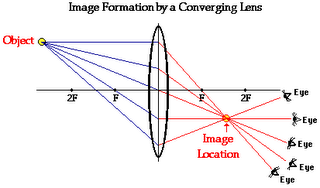
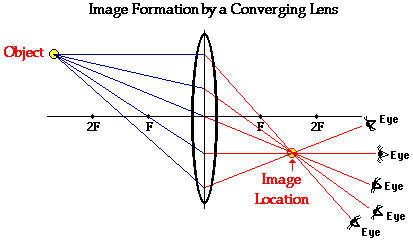
When light enters the lens, the light gets focused onto our camera sensor. Just like how your eye glasses can have different strengths, camera lenses have different strengths too. To measure this we use the term focal length. Focal length is measured in millimeters (mm). If you want to shoot something far away, you will want a lense with a large focal length (ex. 800mm). These are called telephoto lenses. If you want to shoot something thats really huge and you don't want to step back so much to get everything in the shot, you'll want a small focal length (eg, 17mm) these are often called wide-angle lenses. An easy way to remember this is to imagine that all the light that enters the lens is in the shape of a cone and the focal length controls the height of this cone. Smaller focal length means you have a short cone with a shallow slope so the light cone casts a wide view (ie wide angle lens). Larger focal length means a steep cone so things far away seem bigger (ie telephoto lens). When you zoom in or out you are changing the focal length of the lense. As you can imagine, a larger cone allows more light in which will change your exposure. Conversely, a telephoto lens allows less light to enter, however that is not the only issue. With telephoto lenses, the image magnification, also causes angular camera motions to be magnified. That is, as you zoom in, any movement in the hands holding the camera will be magnified in the photo.
Usually the scene you are trying to capture will dictate what lens or focal length you will use. However, sometimes if you cannot get enough light or you cannot hold your camera steady enough, it might be better to use a lower focal length and resize the image in post processing later.
2. Aperture
Besides, focal length, the next most important aspect of a lense is how much light it can let in. Usually the light that enters at the edges of a lense gets distorted so camera lenses limit that light with an O-shaped disk placed between the lenses. The hole in this disk is called the aperture and can be enlarged or reduced by the camera or by rotating a ring on the lens itself. A bigger hole lets more light in but with a more narrow depth of field (which we'll get into later). Aperture is measured in f-values (ex. f/22 or f22) . The lower the f-value, the bigger the aperture so f/22 has a much smaller hole than f/1.4.
When buying a lens or a camera with a lens you will probably see it listed like this: 18-55mm F/3.5-5.6.
The first part means that the focal length can vary between 18mm and 55mm, but the second part doesn't mean the aperture can be from f3.5 to f5.6. It means that the largest aperture can vary between f/3.5-f/5.6. Most lenses can easily produce small apertures f/30+. The hard part is keeping the apertures large throughout the range of focal lengths. That's why the largest aperture that you can use will shrink when you zoom in.
Depth of field is the range of distances from the camera where things will be in focus. Lets say you wanted to take some landscape photos. You would probably like the wildlife in the foreground and the mountains in the background to both be in focus. In this case you want to have a wide depth of field. On the other hand, suppose you wanted to emphasize the subject of the photo, you could use a large aperture to create a shallow depth of field so that only the subject of the photo is in focus. The photo to the left is my baby Sophia sleeping next to her mom. Notice how Sophia is in focus while my wife isn't. This was shot with an aperture of f/2.8.
2. Shutter Speed
Shutter speed is the amount of time that the aperture will remain open so that light from the scene can reach the camera's sensor. This is measured in seconds or fractions of a sec like 1/30. Since most photos are taken with shutter speeds like 1/20, 1/30, 1/100, etc, your camera may show only the denominator of the fractional part like so 1/20 is shown as 20, 1/30 as 30 and 1/100 as 100. Long shutter speeds like over 1 second, will usually be displayed with a double quotation mark, like 2".
The combination of shutter speed and aperture determines how much light gets to the sensor, i.e. the exposure. For example, if you let light through a large aperture for a short time, you can still get the same exposure by letting light through a small aperture for a longer time.
The biggest drawback to a long exposure is that the camera and the scene has to be perfectly still during the entire time that the shutter is open, otherwise your photo will be blurry. This type of blur is known as motion blur. In the photo on the right, you can see how the the people who were moving look kinda ghostly while everything else is pretty sharp. The woman in the center remained almost perfectly still during the shot so she had almost no motion blur. This was a 2 second shot (shutter speed) at f/8.
3. ISO Sensitivity
Also known as the ISO speed, the ISO sensitivity of the camera's sensor is the third and final component of determining a photo's exposure. Camera sensors usually have the ability for you to increase or decrease its sensitivity. You can think of this like the volume knob on your car radio. If you get a weak signal, you can up the volume, but the more you turn the knob, the more noise you will get. ISO sensitivity works the same way. The higher the sensitivity, the less light you will need, but at the cost of more noise in your photo. Ideally, you want to use the smallest ISO possible for the aperture and shutter speed that gives you good results. Often times the lowest shutter speed that minimizes your motion blur is the driving factor for the ISO you use. Its usually easier to correct ISO noise in post processing than motion blur.
Ever since the advent of the first digital camera, photography has experienced an explosion of growth. Nowadays, its hard to even find a cell phone without a camera. Unfortunately, the ability to take limitless shots without wasting any film and the ubiquitousness of the digital camera has not done anything to improve the quality of the pictures we take. I'd like to change that.
Taking good photos is not difficult. You don't need an expensive equipment, and once you get it you may find photography to be a fun and rewarding hobby.
Camera Operation
Cameras work by allowing light to come through the lense which focuses it onto some sort of sensor (or film for traditional cameras). The light is only exposed to the sensor for a very brief amount of time. That light will cause the sensor to create all sorts of electrical signals representing the image that the camera sees at that point in time. The camera's internal computer will then convert those signals into a digital image file on your memory stick. I've glossed over several details here, but this is the general idea and it will serve as the basis for the rest of the article.
The Basics of Exposure
Exposure is all about how we get the light from the scene you are photographing, to the camera's sensor. Most digital cameras allow you to modify 3 basic components for controlling your exposure. Understanding how these components affect your exposure will help you keep most of your photos out of the recycle bin.
1. Lenses
When light enters the lens, the light gets focused onto our camera sensor. Just like how your eye glasses can have different strengths, camera lenses have different strengths too. To measure this we use the term focal length. Focal length is measured in millimeters (mm). If you want to shoot something far away, you will want a lense with a large focal length (ex. 800mm). These are called telephoto lenses. If you want to shoot something thats really huge and you don't want to step back so much to get everything in the shot, you'll want a small focal length (eg, 17mm) these are often called wide-angle lenses. An easy way to remember this is to imagine that all the light that enters the lens is in the shape of a cone and the focal length controls the height of this cone. Smaller focal length means you have a short cone with a shallow slope so the light cone casts a wide view (ie wide angle lens). Larger focal length means a steep cone so things far away seem bigger (ie telephoto lens). When you zoom in or out you are changing the focal length of the lense. As you can imagine, a larger cone allows more light in which will change your exposure. Conversely, a telephoto lens allows less light to enter, however that is not the only issue. With telephoto lenses, the image magnification, also causes angular camera motions to be magnified. That is, as you zoom in, any movement in the hands holding the camera will be magnified in the photo.Usually the scene you are trying to capture will dictate what lens or focal length you will use. However, sometimes if you cannot get enough light or you cannot hold your camera steady enough, it might be better to use a lower focal length and resize the image in post processing later.
2. Aperture
Besides, focal length, the next most important aspect of a lense is how much light it can let in. Usually the light that enters at the edges of a lense gets distorted so camera lenses limit that light with an O-shaped disk placed between the lenses. The hole in this disk is called the aperture and can be enlarged or reduced by the camera or by rotating a ring on the lens itself. A bigger hole lets more light in but with a more narrow depth of field (which we'll get into later). Aperture is measured in f-values (ex. f/22 or f22) . The lower the f-value, the bigger the aperture so f/22 has a much smaller hole than f/1.4.
When buying a lens or a camera with a lens you will probably see it listed like this: 18-55mm F/3.5-5.6.
The first part means that the focal length can vary between 18mm and 55mm, but the second part doesn't mean the aperture can be from f3.5 to f5.6. It means that the largest aperture can vary between f/3.5-f/5.6. Most lenses can easily produce small apertures f/30+. The hard part is keeping the apertures large throughout the range of focal lengths. That's why the largest aperture that you can use will shrink when you zoom in.
Depth of field is the range of distances from the camera where things will be in focus. Lets say you wanted to take some landscape photos. You would probably like the wildlife in the foreground and the mountains in the background to both be in focus. In this case you want to have a wide depth of field. On the other hand, suppose you wanted to emphasize the subject of the photo, you could use a large aperture to create a shallow depth of field so that only the subject of the photo is in focus. The photo to the left is my baby Sophia sleeping next to her mom. Notice how Sophia is in focus while my wife isn't. This was shot with an aperture of f/2.8.2. Shutter Speed
Shutter speed is the amount of time that the aperture will remain open so that light from the scene can reach the camera's sensor. This is measured in seconds or fractions of a sec like 1/30. Since most photos are taken with shutter speeds like 1/20, 1/30, 1/100, etc, your camera may show only the denominator of the fractional part like so 1/20 is shown as 20, 1/30 as 30 and 1/100 as 100. Long shutter speeds like over 1 second, will usually be displayed with a double quotation mark, like 2".
The combination of shutter speed and aperture determines how much light gets to the sensor, i.e. the exposure. For example, if you let light through a large aperture for a short time, you can still get the same exposure by letting light through a small aperture for a longer time.
3. ISO Sensitivity
Also known as the ISO speed, the ISO sensitivity of the camera's sensor is the third and final component of determining a photo's exposure. Camera sensors usually have the ability for you to increase or decrease its sensitivity. You can think of this like the volume knob on your car radio. If you get a weak signal, you can up the volume, but the more you turn the knob, the more noise you will get. ISO sensitivity works the same way. The higher the sensitivity, the less light you will need, but at the cost of more noise in your photo. Ideally, you want to use the smallest ISO possible for the aperture and shutter speed that gives you good results. Often times the lowest shutter speed that minimizes your motion blur is the driving factor for the ISO you use. Its usually easier to correct ISO noise in post processing than motion blur.
Subscribe to:
Posts (Atom)